Setting Up Infiniband on Proxmox VE
Note: To use virt_enabled you require a recent version of OpenSM, as the one provided upstream in Debian Stable is 3.3.xx, which is quite old and does not support such flag.
For this we recommend using the DOCA drivers (doca-ofed if infiniband, or doca-roce if ethernet).
See how to install on:
- https://networking-docs.nvidia.com/doca/archive/3-4-0/doca-host-installation-and-upgrade
- https://developer.nvidia.com/doca-downloads?deployment_platform=Host-Server&deployment_package=DOCA-Host&target_os=Linux&Architecture=x86_64&Profile=doca-all&Distribution=Debian&version=13&installer_type=deb_online
This article will cover how to configure an Infiniband card on Proxmox VE —tested on version 9.x, but should apply to newer versions—.
We will use the following terminology:
- IB: Infiniband
- MLX: Mellanox
- SM: Subnet Manager
If you wish to passthrough the IB card to VM’s, you will need to enable SR-IOV, otherwise you may skip all SR-IOV/IOMMU related instructions.
Another important consideration is that we will need to enable the systemd
opensm (Open Subnet Manager) service in the event we wish to use IPoIB
(IP-over-Infiniband).
This service must run only on ONE node in the Infiniband network and is only required if the switch itself does not provide SM support.
Requirements
Requirements for SR-IOV
In the event you require SR-IOV we must enable IOMMU, for that you should refer to the official Proxmox VE documentation:
You’ll also need the Mellanox OFED (now known as DOCA-OFED) Drivers.
Standard Requirements
Once you’ve ensured IOMMU is enabled, we must install the following required packages and dependencies:
- infiniband-diags
- ibutils
- rdma-core
- rdmacm-utils
- mstflint
- doca-ofed (only if using SR-IOV)
- doca-roce (only if using SR-IOV)
apt update -y
apt install -y infiniband-diags ibutils rdma-core rdmacm-utils mstflint

# If using SR-IOV, you'll need these on the physical host, see the note above
# about DOCA NVIDIA Drivers.
apt install -y doca-ofed doca-roce
Configuring OpenSM
If you’re using Infiniband and your switch does not have a Subnet Manager, you will need to configure OpenSM.
As stated before to use Virtualization (SR-IOV) you’ll need a newer version of OpenSM (>= 4).
If not, then you can simply use the Debian Upstream version (3.3.11 as of 2026).
To setup OpenSM you first want to create the basic config file with the following command:
opensm --create-config /etc/opensm/opensm.conf
Do not enable the service, as we will start it automatically from the GUID initialization script later on.
If you require SR-IOV make sure virt_enabled is set to 2 in
your /etc/opensm/opensm.conf file.
Enabling the Required Modules
You will need to add two files:
# /etc/modules-load.d/infiniband.conf
mlx5_core
mlx5_ib
ib_umad
ib_uverbs
ib_ipoib
svcrdma
# /etc/modules-load.d/iommu.conf
vfio
vfio_iommu_type1
vfio_pci
Manually Enabling SR-IOV
In this article we will use 4 GUIDs / Virtual IOs for passing through the Mellanox card as it’s a performance oriented count, however if you require more density you can adjust all the scripts to a higher count (8 or 16).
Getting the Identifiers
To enable SR-IOV we must first identify the Mellanox card’s PCI Bus.
lspci | grep -i mellanox
You will get the following output (or something similar):
01:00.0 Infiniband Controller: Mellanox Technologies MT28908 Family [ConnectX-6]
This tells us the PCI Bus is 01:00.0 so we will set it as a variable for easy
reference in the following commands.
# Get the MLX Device Name and Bus
## Method 1
MLX_DEV=$(ibstat --list_of_cas | head -n 1)
MLX_BUS=$(lspci | grep -i mellanox | grep -iv "virtual function" | awk '{print $1}')

## Method 2
MLX_BUS=$(ethtool -i "${MLX_DEV}" | grep "bus-info" | awk -F ": " '{print $NF}')
MLX_DEV=$(ls "/sys/bus/pci/devices/${MLX_BUS}/net/" | head -n 1)
Check that the variables are correct:
cat << EOL
Mellanox Device: ${MLX_DEV}
Mellanox PCI Bus: ${MLX_BUS}
EOL
You should get something like:
# THIS
Mellanox Device: ibp1s0
Mellanox PCI Bus: 01:00.0
# OR THIS
Mellanox Device: ibp1s0
Mellanox PCI Bus: 0000:01:00.0
Setting up the Automatic GUIDs
We need to setup some scripts and services so that the IB card will create the VFIO GUIDs automatically on system start.
First we can query the card details:
# Command
root@pve:~# mstflint -d "$MLX_BUS" q

# Output
Image type:            FS4
FW Version:            20.31.1014
FW Release Date:       30.6.2021
Product Version:       20.31.1014
Rom Info:              type=UEFI version=14.24.13 cpu=AMD64,AARCH64
                       type=PXE version=3.6.403 cpu=AMD64
Description:           UID                GuidsNumber
Base GUID:             e8ebd30300a022fe        0
Base MAC:              e8ebd3a022fe            0
Image VSD:             N/A
Device VSD:            N/A
PSID:                  MT_0000000222
Security Attributes:   N/A
As we can see we have no GUIDs, we will also enable those (besides SR-IOV) with the following command:
# Command
root@pve:~# mstconfig -d "$MLX_BUS" set SRIOV_EN=1 NUM_OF_VFS=4

# Output
Device #1:
----------

Device type:        ConnectX6
Name:               MCX653105A-ECA_Ax
Description:        ConnectX-6 VPI adapter card; 100Gb/s (HDR100; EDR IB and 100GbE); single-port QSFP56; PCIe3.0 x16; tall bracket; ROHS R6
Device:             01:00.0

Configurations:                                          Next Boot       New
        SRIOV_EN                                    True(1)              True(1)
        NUM_OF_VFS                                  4                    4

 Apply new Configuration? (y/n) [n] : y
Now we need to automatically initialize the GUIDs on startup, and for that we can use the scripts kindly provided and open-sourced by jose-d on his repository.
Create the following script /usr/local/bin/init-ib-guids.sh with the content
below:
#!/bin/bash
first_dev=$(ibstat --list_of_cas | head -n 1)
node_guid=$(ibstat ${first_dev} | grep "Node GUID" | cut -d ':' -f 2 | xargs | cut -d 'x' -f 2)
port_guid=$(ibstat ${first_dev} | grep "Port GUID" | cut -d ':' -f 2 | xargs | cut -d 'x' -f 2)

# VFIO Count Config.
vf_num=4
vf_len=$(( $vf_num - 1 ))
doca_packages=$(dpkg -l|awk '{print $2}'|grep -E "^doca")

# If it has DOCA use the Physical device, otherwise use the first in ibstat
if [[ ${#doca_packages} -gt 0 ]]; then
    physical_dev=$(ip -br link show|grep -E "^ib"|head -n 1|awk '{print $1}')
    echo "${vf_num}" > "/sys/class/infiniband/${first_dev}/device/mlx5_num_vfs"
else
    physical_dev="${first_dev}"
    echo "${vf_num}" > /sys/class/infiniband/${MLX_DEV}/device/sriov_numvfs
fi

echo "physical dev: $physical_dev"
echo "first dev: $first_dev"
echo "node guid: $node_guid"
echo "port_guid: $port_guid"

if ip link show $physical_dev &> /dev/null ; then
  for vf in $(seq 0 $vf_len)$; do
    vf_guid=$(echo "${port_guid::-5}cafe$((vf+1))" | sed 's/..\B/&:/g')
    echo "$physical_dev (${physical_dev}v${vf}): vf_guid for vf $vf is $vf_guid"
    ip link set dev ${physical_dev} vf $vf port_guid ${vf_guid}
    ip link set dev ${physical_dev} vf $vf node_guid ${vf_guid}
    ip link set dev ${physical_dev} vf $vf state auto
  done
fi

## Section below was added to start opensm after GUID startup
enable_opensm=false

for arg in "$@"; do
    case $arg in
        --enable-opensm)
            enable_opensm=true
            shift
            ;;
    esac
done

if $enable_opensm; then
    echo "OpenSM is enabled, starting service after VFIO GUIDs Settle."
    sleep 3s
    systemctl start opensm.service
fi
Don’t forget to make the script executable and root owned.
chown root:root /usr/local/bin/init-ib-guids.sh
chmod +x /usr/local/bin/init-ib-guids.sh
After that we can create the systemd service for it:
With OpenSM Startup
cat > /etc/systemd/system/mellanox-initvf.service << EOF
[Unit]
After=network.target

[Service]
Type=oneshot
# note: change according to your hardware:
ExecStart=/usr/local/bin/init-ib-guids.sh --enable-opensm
StandardOutput=journal
TimeoutStartSec=60
RestartSec=60

[Install]
WantedBy=multi-user.target
EOF
Without OpenSM Startup
cat > /etc/systemd/system/mellanox-initvf.service << EOF
[Unit]
After=network.target

[Service]
Type=oneshot
# note: change according to your hardware:
ExecStart=/usr/local/bin/init-ib-guids.sh
StandardOutput=journal
TimeoutStartSec=60
RestartSec=60

[Install]
WantedBy=multi-user.target
EOF
Then enable it:
# Enable service on-boot
systemctl enable mellanox-initvf.service

# Enable with now flag will also start it
systemctl enable mellanox-initvf.service --now
Now reboot the physical node.
On bootup you should see something akin to this:
# Without DOCA
root@pve:~# ibstat --list_of_cas
ibp1s0
mlx5_1
mlx5_2
mlx5_3
# With DOCA
root@pve:~# ibstat --list_of_cas
mlx5_0
mlx5_1
mlx5_2
mlx5_3

# Without DOCA you'll get the physical device instead of mlx5_0
root@pve:~# ibstat
CA 'ibp1s0'
        CA type: MT4123
        Number of ports: 1
        Firmware version: 20.31.1014
        Hardware version: 0
        Node GUID: 0xe8ebd30300a022fe
        System image GUID: 0xe8ebd30300a022fe
        Port 1:
                State: Active
                Physical state: LinkUp
                Rate: 100
                Base lid: 1
                LMC: 0
                SM lid: 1
                Capability mask: 0x2651e84a
                Port GUID: 0xe8ebd30300a022fe
                Link layer: InfiniBand
CA 'mlx5_1'
        CA type: MT4124
        Number of ports: 1
        Firmware version: 20.31.1014
        Hardware version: 0
        Node GUID: 0x0000000000000000
        System image GUID: 0xe8ebd30300a022fe
        Port 1:
                State: Down
                Physical state: LinkUp
                Rate: 100
                Base lid: 65535
                LMC: 0
                SM lid: 1
                Capability mask: 0x2651ec48
                Port GUID: 0x0000000000000000
                Link layer: InfiniBand
CA 'mlx5_2'
        CA type: MT4124
        Number of ports: 1
        Firmware version: 20.31.1014
        Hardware version: 0
        Node GUID: 0x0000000000000000
        System image GUID: 0xe8ebd30300a022fe
        Port 1:
                State: Down
                Physical state: LinkUp
                Rate: 100
                Base lid: 65535
                LMC: 0
                SM lid: 1
                Capability mask: 0x2651ec48
                Port GUID: 0x0000000000000000
                Link layer: InfiniBand
CA 'mlx5_3'
        CA type: MT4124
        Number of ports: 1
        Firmware version: 20.31.1014
        Hardware version: 0
        Node GUID: 0x0000000000000000
        System image GUID: 0xe8ebd30300a022fe
        Port 1:
                State: Down
                Physical state: LinkUp
                Rate: 100
                Base lid: 65535
                LMC: 0
                SM lid: 1
                Capability mask: 0x2651ec48
                Port GUID: 0x0000000000000000
                Link layer: InfiniBand
You might also want to check that your opensm.service is running:
root@pve:~# systemctl status opensm.service
● opensm.service - Starts the OpenSM InfiniBand fabric Subnet Managers
     Loaded: loaded (/usr/lib/systemd/system/opensm.service; disabled; preset: enabled)
     Active: active (exited) since Wed 2025-10-22 12:34:51 -03; 57min ago
 Invocation: 10e467fed7744e15978b29d595e599de
       Docs: man:opensm(8)
    Process: 495736 ExecCondition=/bin/sh -c if test "$PORTS" = NONE; then echo "opensm is disabled via PORTS=NONE."; exit 1; fi (code=exited, status=0/SUCCESS)
    Process: 495737 ExecStart=/bin/sh -c if test "$PORTS" = ALL; then PORTS=$(/usr/sbin/ibstat -p); if test -z "$PORTS"; then echo "No InfiniBand ports found."; exit 0>
   Main PID: 495737 (code=exited, status=0/SUCCESS)
   Mem peak: 3M
        CPU: 34ms

Oct 22 12:34:51 pve systemd[1]: Starting opensm.service - Starts the OpenSM InfiniBand fabric Subnet Managers...
Oct 22 12:34:51 pve sh[495737]: Starting opensm on following ports: 0xe8ebd30300a022fe
Oct 22 12:34:51 pve systemd[1]: Finished opensm.service - Starts the OpenSM InfiniBand fabric Subnet Managers.
You should now be able to set an IP address on the physical Infiniband card on Proxmox VE (on the physical NIC, not a VF), and pass it through to your guests.
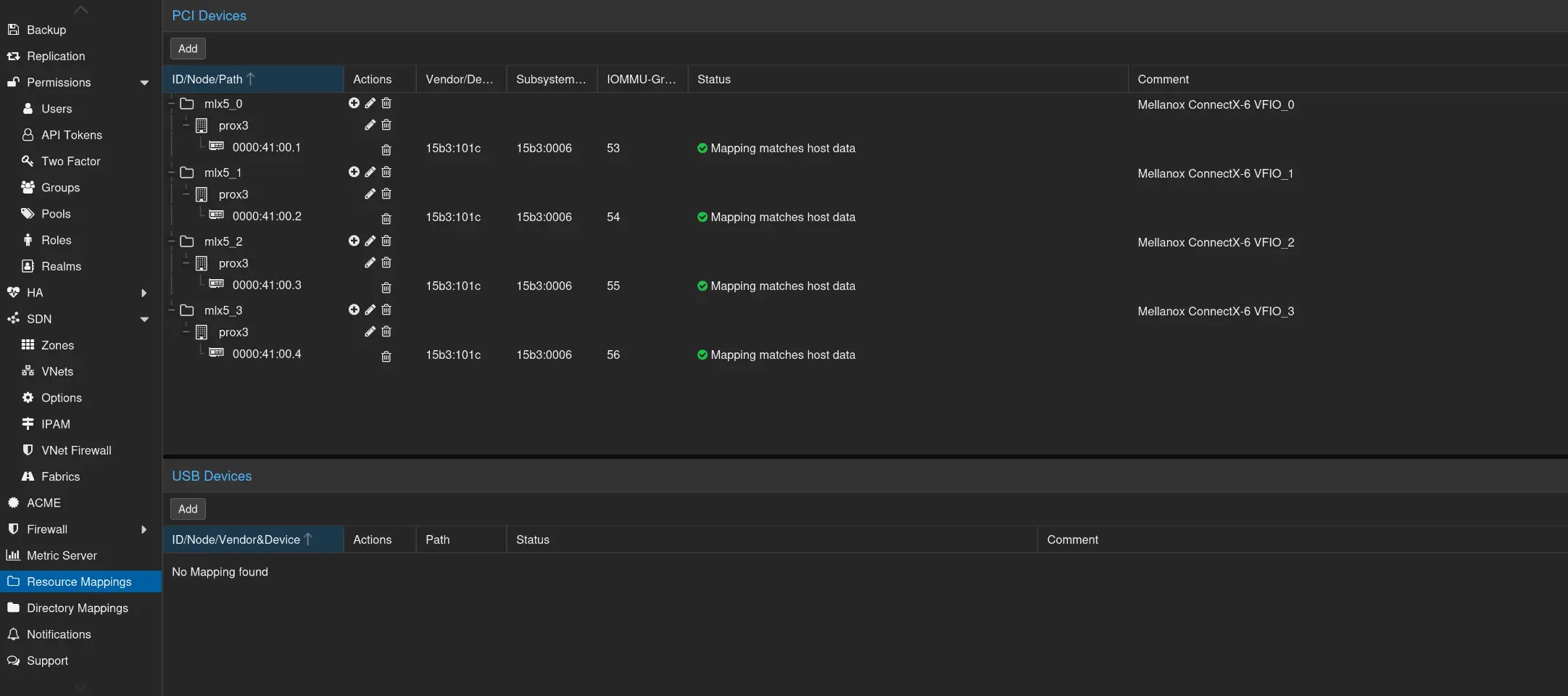
Resource Mapping
Now you can also do resource mapping for your Infiniband VFIOs by going to
Datacenter -> Resource Mappings -> PCI Devices -> Add
Then add each Virtual Function (don’t add the parent physical PCI-E Device or you’ll loose it on the physical host).
Sources
https://forum.proxmox.com/threads/tutorial-proxmox-8-mellanox-infiniband-and-sr-iov.146196/